The Message That Eats Your Day
If you sell online in Egypt, you know this message:
"Where's my order?" "Has it shipped?" "When will the courier arrive?"
One buyer can send it five times. You have 20 orders a day. Quick math: 100 daily messages about one single thing.
That time could go to: - Shooting a new product - Replying to a new prospect - Improving your Instagram captions
Instead you're stuck in the "reply every 5 minutes" loop.
The Fix: Every Buyer Tracks Themselves
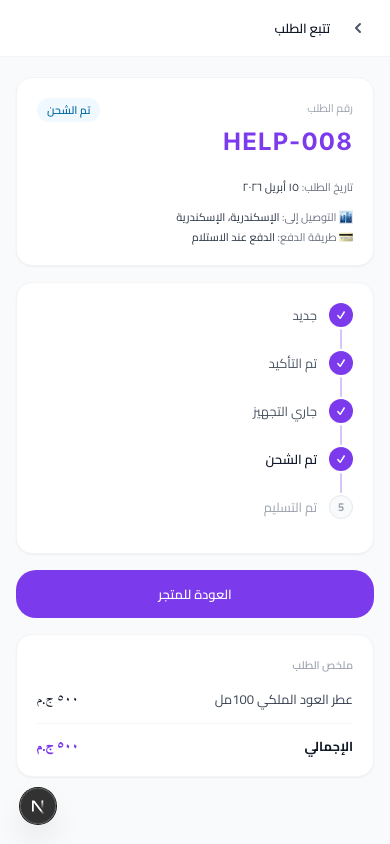
sellX sends every buyer a personal tracking link after checkout — same feel as Amazon or Noon — showing:
- Order number and customer name
- Timeline of stages: NEW → CONFIRMED → PREPARING → SHIPPED → DELIVERED
- Date of each step (when confirmed, when shipped)
- Product name and total amount
- Expected payment method (usually COD)
The link works on mobile directly, no login, for 30 days.
How It Works — Automatically
Step 1: Buyer places an order
When someone orders from youraccount.sell1x.com, the system generates a unique tracking token per order. It's a random, unguessable ID.
Step 2: Link goes to the buyer
A URL like: `` https://youraccount.sell1x.com/orders/a8f3k2mQpL9 ``
Appears in: - The "Order confirmed" page shown right after checkout - The WhatsApp confirmation message (if you use the sellX template) - The order receipt
Step 3: Buyer saves the link and checks whenever they want
Instead of messaging you, they open the link and see the current status themselves.
Step 4: Every status change you make updates their view in real time
You update from your dashboard (e.g. "Shipped"). Their timeline refreshes instantly.
How to Introduce the Link Professionally
In the first confirmation
sellX's WhatsApp confirmation template includes the link automatically. Nothing to set up.
After you ship
Send a short line: > "Shipped today, [Customer Name]. Track it here: [link]"
This alone blocks 80% of "where's my order?" messages before they happen.
In your WhatsApp status
When volume spikes, post: > "Every order has its own tracking link. Check the first message you got from us. 🙏"
Why This Beats the Alternative
Most sellers send a screenshot of their admin panel, or retype the status into a WhatsApp message. Every interaction costs time.
sellX gives each buyer their own view — no effort from you. They open the link whenever they want and see the info themselves.
The bigger win: the link looks professional. Buyers feel like they're ordering from a real company, not someone selling from home.
Tips to Drive "Where's My Order?" to Zero
1. Update the status the moment it changes When the supplier ships to you, flip to "Preparing". When the courier takes it, flip to "Shipped". Each update = fewer messages.
2. Share the link in 3 places Confirmation message + shipping message + email (if you captured it).
3. Explain the link once to new buyers In the first reply: "You can track your order anytime from this link 👇". One line, teaches the habit.
4. Don't rely on WhatsApp alone WhatsApp messages get buried. The tracking link stays live for 30 days — buyers find it even after clearing the chat.
The Bottom Line
Every minute you spend answering "where's my order?" is a minute stolen from growth.
sellX fixes it from the very first order — no setup, no plugins, no paywall.
Try sellX free and let your buyers track themselves ←
Read next: How to track customer orders without chaos