Upfront Payment — Protection or Barrier?
In Egypt, most online orders are cash on delivery (COD). This is a natural preference as trust in online selling continues to build.
But as a seller, COD carries risks: - Fake orders that cost shipping fees - Customers refusing to accept delivery - Wasted time and effort preparing orders
The balanced solution: Build a verification system that protects your business without creating friction for genuine customers.
Types of Payment in the Egyptian Market
1. Cash on Delivery (COD)
The most common. The customer pays when they receive the order.
Advantages: Increases order rates — customers buy with more confidence. Risks: Risk of delivery refusal or fake orders.
2. Bank Transfer / InstaPay
The customer transfers the amount before shipping. Suitable for large orders or distant areas.
3. Mobile Wallet (Vodafone Cash, Etisalat Cash)
Fast and convenient. Suitable for customers without a bank card.
When to Request Upfront Payment
Not every order needs upfront payment. Build a clear policy:
| Order Type | Suggested Policy |
|---|---|
| Orders under 300 EGP — existing customer | COD without verification |
| Orders under 300 EGP — new customer | COD + WhatsApp confirmation |
| Orders 300–1,000 EGP | Confirmation call + COD |
| Orders over 1,000 EGP | 20–30% deposit or full payment |
| Custom / made-to-order products | Full upfront payment |
| Remote areas — new customer | Deposit + COD for balance |
Steps to Verify Upfront Payment
Step 1: Request a Payment Receipt
When the customer pays, ask them to send you: - A screenshot from the banking app - The transaction ID number
Step 2: Verify the Receipt
For bank transfers: - Confirm the name: sender's name matches customer's name - Confirm the amount: exactly the order price - Confirm the date: today's (not an old receipt) - Confirm your account number: the amount went to your correct account
For mobile wallets: - Check the SMS you received - Confirm the sender's number matches the customer's number
Step 3: Confirm Receipt Before Shipping
After you confirm the money arrived, send the customer a confirmation:
``` ✅ Payment received successfully!
Hi [Name], We received your payment of [Amount] EGP successfully. Your order #[Number] will be prepared and shipped within [timeframe]. Thank you 😊 ```
Managing Payment Proofs in sellX
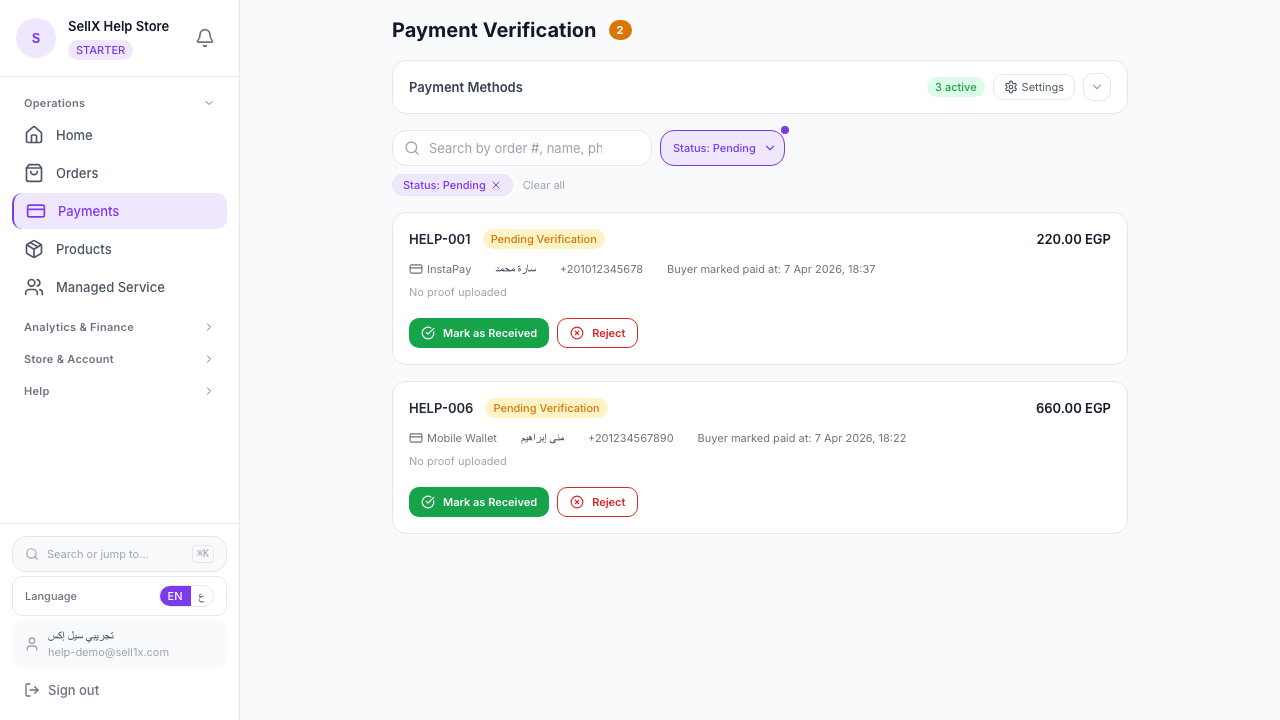
sellX has a dedicated system for managing payment proofs:
How it works: 1. The customer uploads a receipt image with their order 2. The order arrives with a status of "Pending Payment Verification" 3. You open the order and see the receipt image 4. If everything is correct, tap "Confirm Payment" and the order moves to "Confirmed" 5. If there's an issue, you contact the customer directly
System advantages: - All proofs in one place - Nothing gets lost in WhatsApp messages - Full history of every transaction
Signs of a Fake Receipt
Unfortunately, some people send fake receipts. Here are the warning signs:
Red flags: - Screenshot isn't from the official banking app - Numbers are unclear or distorted - Sender's name is different from the customer's name - Date is old - Amount is different from the order value
How to verify: - Log into your bank app and check that the amount arrived yourself - Don't rely solely on a receipt image for high-value orders - If in doubt, ask for a brief moment to verify before shipping
How to Request Upfront Payment Without Losing the Customer
Some sellers fear requesting upfront payment because their customers won't accept it. In reality, it's all about how you ask.
Bad way: "I won't ship until you pay upfront."
Good way: `` Hello [Name] 😊 Your order is ready to prepare! For orders over [X] EGP, we ask for a 20% deposit to secure your order and avoid delays. You can transfer [Amount] to [Vodafone Cash / InstaPay number]. After transferring, send me a screenshot of the receipt and we'll start preparing immediately 🚀 ``
The result: - Genuine customers pay easily - Fake customers disappear without you wasting time preparing an order that won't be collected
Building Trust With a Hesitant Customer
Some customers hesitate to pay upfront because they're worried about being scammed. How do you build trust?
1. Prove your real presence Share your address or business registration number. Even if not required, it reassures customers.
2. Share real reviews Photos of happy customers with your products = the best guarantee possible.
3. A trustworthy store When your customer orders from a professional sellX store instead of a random DM, trust rises automatically.
4. Money-back guarantee If possible, offer a "product not as described — we'll make it right" guarantee. This removes fear.
The Bottom Line
Payment verification isn't an obstacle for customers — it's protection for your business and security for your time and effort.
Building a clear, transparent payment system increases trust from genuine customers and automatically filters out non-serious ones.