The COD Problem Every Seller Knows
Cash on delivery is how Egypt buys online — and it's also how sellers lose money:
- A buyer types a fake or careless name and number.
- You pay the courier and ship.
- The buyer doesn't answer, or refuses at the door.
- The package travels back to you, and you eat the round-trip shipping.
A handful of these a week wipes out the profit on your real orders.
The Fix: Verify Before You Ship
sellX gives you two layers of protection, both built to cut fake and flaky COD orders. They're available on every plan, including Free, and you switch them on in one place.
1. Phone OTP at checkout
Require the buyer to verify their phone with a one-time code before the order is placed. A fake number can't receive the code — so it can't place an order. This alone filters out most junk.
2. WhatsApp COD confirmation
For cash orders, sellX asks the buyer to confirm over WhatsApp before you ship. The buyer taps Confirm or Cancel on a simple page. You only ship the ones they confirm.
Step-by-Step Setup
1. Open Checkout settings
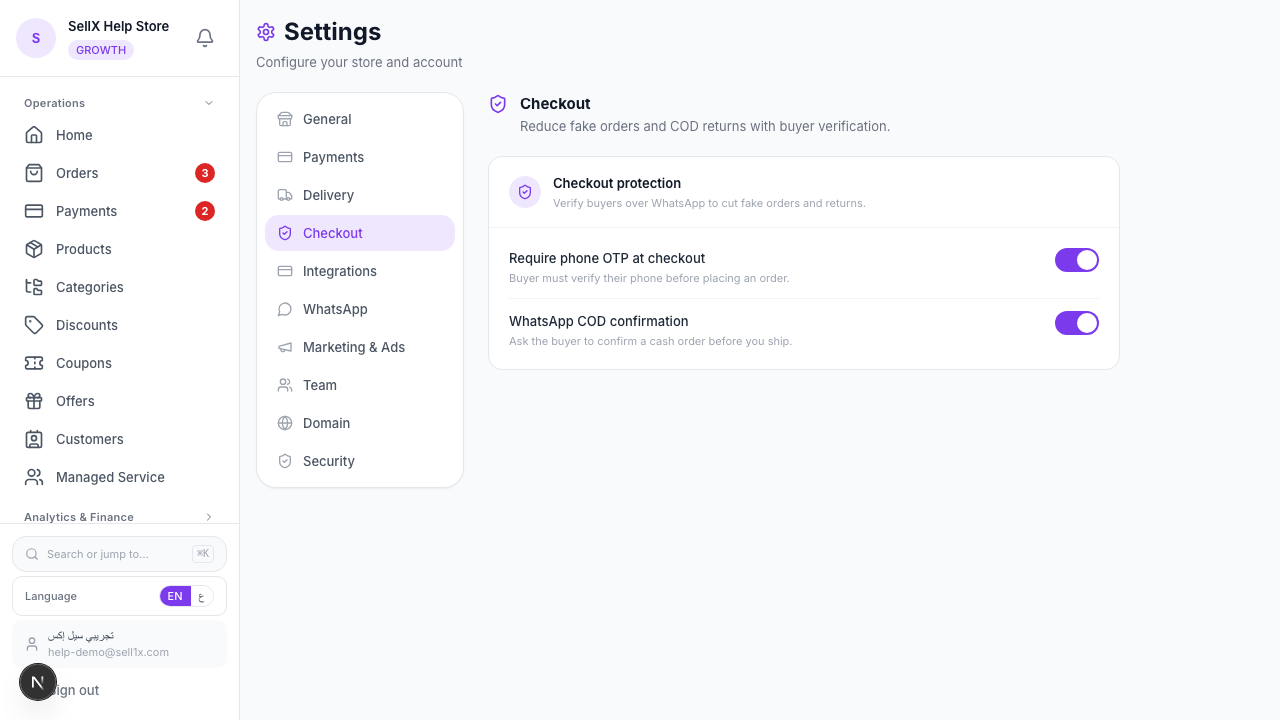
From the dashboard, open Settings, then click the Checkout tab.
2. Turn on the protection you want
You'll see two switches under Checkout protection:
- Require phone OTP at checkout — the buyer must verify their phone before placing an order.
- WhatsApp COD confirmation — the buyer is asked to confirm a cash order before you ship.
Flip on one or both, then Save Changes.
What the Buyer Experiences
With OTP on: at the last step of checkout, the buyer gets a code on WhatsApp and types it in to place the order. Quick, familiar, and impossible to fake.
With COD confirmation on: after placing a cash order, the buyer gets a WhatsApp message with a link. The page asks them to confirm:
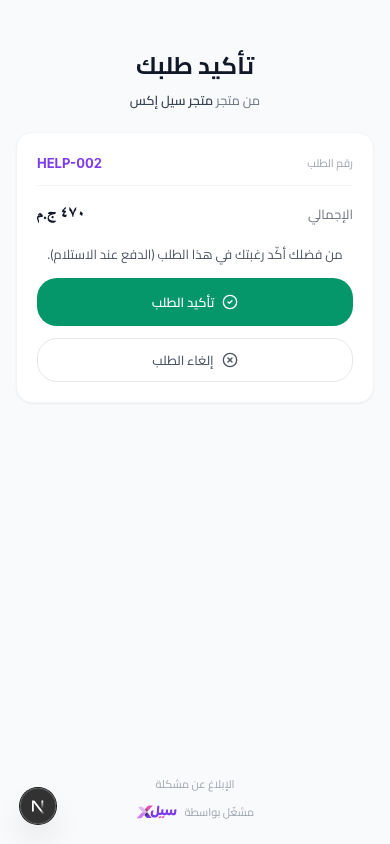
- Confirm order → it's a real, wanted order — ship with confidence.
- Cancel order → you just saved a round-trip shipping fee on an order that was never going to land.
Why This Protects Your Margin
1. Fake numbers can't get through
OTP turns "anyone can type anything" into "only a real, reachable phone can order."
2. You ship intent, not guesses
A confirmed order is a committed buyer. Your delivery success rate climbs and your returns fall.
3. It scales your trust in COD
Once you trust your COD pipeline, you can confidently accept cash orders from far governorates you used to refuse.
Tips
- Start with COD confirmation. It's the lightest touch and stops the most painful losses (the door-refusal).
- Add OTP if you get a lot of junk orders. If fake numbers are flooding you from ads, OTP shuts that down.
- Confirm, then book the courier. Pair this with Bosta shipping so you only book pickups for confirmed orders.
- Keep the experience fast. Both flows are one tap for genuine buyers — they won't slow real customers down.
The Bottom Line
You can't control who clicks "order," but you can make sure you only ship to people who mean it. OTP and COD confirmation turn cash on delivery from a gamble into a reliable channel.
Start on sellX and protect your COD orders ←
Read next: How to avoid fake orders and protect your time and effort