The Two Pieces Every Ad Campaign Needs — And Most Sellers Don't Have
A Cairo seller boosts a reel for 2,000 EGP. The reel runs. Maybe five people order — but they messaged her on Instagram, not via the storefront. Facebook's ad report shows "12 link clicks, 0 conversions." She concludes ads don't work and stops running them.
The ads worked. The tracking didn't. Two pieces were missing:
- A product catalog Facebook could read — without one, the ad shows a single static image instead of shoppable products
- A Pixel on her storefront — without one, Facebook never learns who actually buys, so the algorithm never finds more buyers like them
sellX gives you both, automatically. No developer, no copy-pasting scripts into your HTML, no plugins.
What Connects to What
| Where you advertise | What it pulls from your sellX store |
|---|---|
| Facebook & Instagram posts, ads, Reels | Meta product catalog feed |
| TikTok Shop, ads, Reels | TikTok catalog feed |
| Google Shopping ads | Google Merchant feed |
| Any Pixel-based campaign | Meta Pixel + TikTok Pixel events |
One sellX store. Three catalog feeds. Two pixels. Connected once, refreshed daily, forever.
Setup
Open Settings → Pixels & tracking in your dashboard. You'll see two sections.
Section A — Product Feeds
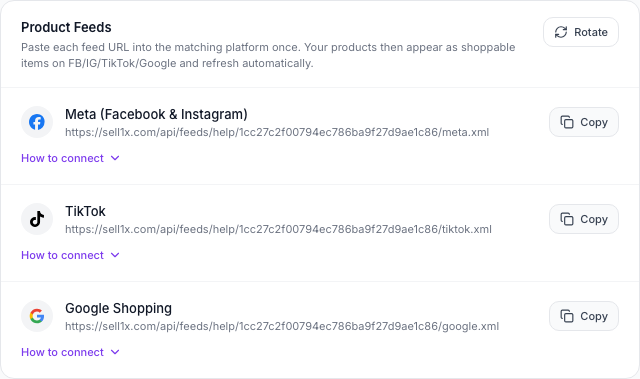
You have three feed URLs — one for Meta, one for TikTok, one for Google. Click "Copy" once per platform. Then:
For Meta (Facebook & Instagram):
- Open business.facebook.com/commerce → Catalogs → Create Catalog → E-commerce
- In the new catalog: Data Sources → Add Items → Data File
- On the next screen, pick the URL / scheduled upload option, paste your Meta feed URL, and set the frequency to Daily
- Connect the catalog to your Facebook Page and Instagram Shopping account
For TikTok:
- Open business.tiktok.com → Tools → Catalog Manager → Create Catalog
- Name it, pick Egypt as country and EGP as currency
- Items → Set Up Data Feed, paste your TikTok feed URL
- Connect to TikTok Business Account / TikTok Shop
For Google Shopping:
- Sign up at merchants.google.com
- Products → Feeds → Add primary feed → Scheduled fetch
- Paste your Google feed URL. Country: Egypt. Frequency: Daily
Every product on your store now becomes a shoppable item on every connected platform. Add a product in sellX, and it appears in your Meta catalog within 24 hours — no extra work.
Section B — Pixel Tracking
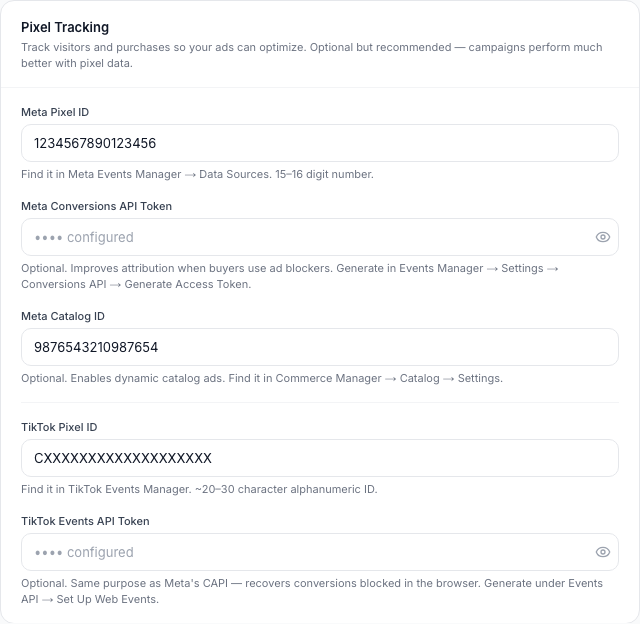
The Pixel ID is how Facebook and TikTok know which storefront events to attribute to which ad. Without it, your ad reports are blind.
To set up Meta Pixel:
- Open Meta Events Manager → Data Sources → Create New
- Pick Pixel, name it (e.g. "Sara Fashion"), copy the Pixel ID (15–16 digit number)
- Paste it into the Meta Pixel ID field in sellX → Save
To set up TikTok Pixel:
- Open TikTok Events Manager → Web Events → Set Up
- Pick Manual installation, copy the Pixel ID (~24 character code)
- Paste it into the TikTok Pixel ID field in sellX → Save
That's it. The pixels are now live on your storefront. PageView, ViewContent, AddToCart, InitiateCheckout and Purchase events fire automatically as buyers browse and order — no extra code.
The Five Events That Make Your Ads Smart
Once your Pixel is connected, sellX fires these events automatically. Every one is a signal that helps Facebook and TikTok find more buyers like the ones who already bought from you:
| Event | When it fires | What it tells Facebook/TikTok |
|---|---|---|
| PageView | Buyer opens any page on your store | "This person visits stores like mine" |
| ViewContent | Buyer opens a product page | "This person is interested in this product" |
| AddToCart | Buyer adds something to cart | "High intent — about to convert" |
| InitiateCheckout | Buyer reaches the checkout form | "Very high intent — retarget if they don't finish" |
| Purchase | Buyer completes an order | "Conversion! Find more people exactly like this one" |
The more events the Pixel sees, the smarter your ad targeting gets. After your store accumulates 50 Purchase events, Facebook's "Lookalike Audiences" become genuinely useful.
Why Your Conversions Don't Get Blocked Here
iOS Safari, ad blockers and privacy extensions silently block 20–40% of browser Pixel events. That means Facebook is missing every fifth conversion — and your "cost per purchase" looks 25% worse than it really is.
sellX fixes this by also reporting Purchase events server-side, directly from our servers to Meta and TikTok. Same event, same buyer, sent twice (once by the browser Pixel, once by the server). Meta and TikTok match the two and count it once — but now they count every purchase, not just the ones browsers let through.
To turn this on, paste a Conversions API Token into the optional field in the Pixel section. We'll mark it as "configured" and recover the conversions browsers block.
This is the same setup big brands pay agencies thousands of EGP to wire up. On sellX, you paste one token and save.
Available on Every Plan
Catalog feeds and Pixel tracking are available on every plan, including Free. There's no upgrade gate.
The reason is honest: ads only work when the catalog and pixel are in place. Putting them behind a paywall would mean Free sellers run unproductive ads and conclude sellX doesn't help. We'd rather Free sellers run good ads, grow their store, and upgrade naturally.
A Note on Privacy: Your Feed URL Is Private by Default
Each feed URL contains a unique 32-character token:
sell1x.com/api/feeds/your-slug/abc123…/meta.xml
Without the token, the URL is unguessable. Competitors can't iterate slugs to scrape your prices or new product launches.
If you ever suspect your URL leaked (a forwarded screenshot, a shared support ticket), tap Rotate in Settings → Pixels & tracking. A new token is generated immediately. Just remember to paste the new URL into Meta, TikTok and Google after rotating — the old URL stops working the moment you rotate.
A Few Common Questions
"Does this work without me running paid ads?" Yes. Even without ads, your products appear in your Instagram Shop and Facebook Shop as shoppable items. Buyers tap a product in your IG bio shop and land on your sellX store. The catalog is useful by itself.
"Do I need to pay Facebook or TikTok to use this?" No. Connecting a catalog and setting up a Pixel is free on every platform. You only pay when you decide to run actual ads.
"Will it slow down my store?" No. Pixel scripts load after the main page renders, so buyers see your products at full speed.
"What if I don't have a Conversions API token yet?" Skip it. The browser Pixel alone works fine — you just lose about 20–30% of conversion attribution to ad blockers. Add the token whenever you're ready.
"How long until my catalog appears on Facebook?" Meta crawls scheduled feeds about once a day. Allow 24 hours after pasting the URL. You can also click "Sync now" inside Commerce Manager to force a refresh.
"What happens if a product is out of stock?" It still appears in the feed, but marked as "out of stock" — Facebook and TikTok stop showing it in ads automatically. Once you restock, the next daily crawl flips it back to "in stock" with no action from you.
The Bottom Line
Most Egyptian sellers run ads without a catalog and without a Pixel — and then conclude ads don't work. The truth is the infrastructure under the ads isn't there.
sellX builds that infrastructure automatically. Set it up once per platform, and every product you add, every order you receive, becomes a signal that makes your next ad campaign smarter.
Set up your pixels and product feeds now →
Read next: How to Take Product Photos That Sell on Instagram