Why Codes Beat "Just Lowering the Price"
Dropping your product price permanently trains buyers to expect cheap. A discount code does the opposite — it gives you a reason to reach out, a deadline to create urgency, and full control over who gets the deal and for how long.
A code like EID20 in an Instagram story, a WELCOME50 for first-time buyers, or a BACK15 to win back an old customer — each one is a marketing campaign you can launch in 30 seconds.
The Fix: Coupons in sellX
sellX lets you create as many codes as you want, each with its own rules:
- Percentage off (e.g. 20%) or fixed amount off (e.g. 50 EGP)
- Minimum order so a code only applies above a basket size
- Redemption limits — total uses, or per-customer
- Expiry date to create a real deadline
- On/off switch so you can pause a code without deleting it
Coupons are available on every plan, including Free.
Step-by-Step Setup
1. Open Coupons
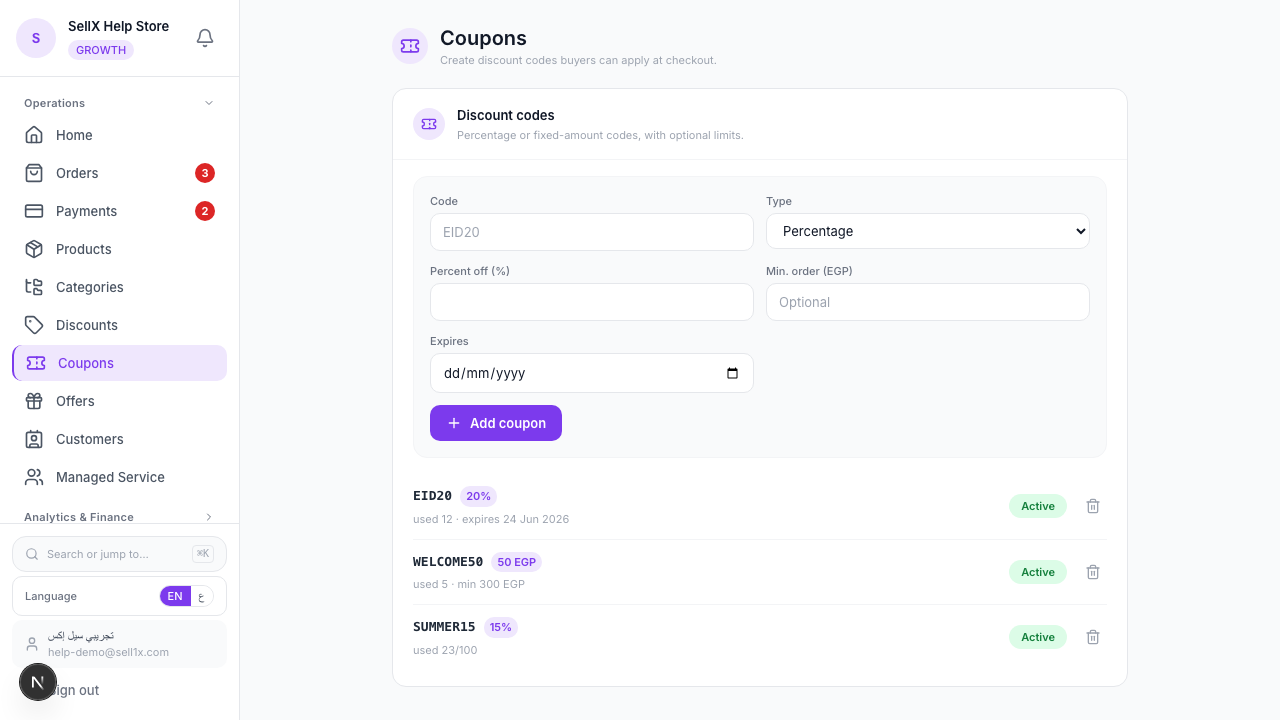
From the dashboard, open the Coupons page.
2. Create a code
Fill in the form:
- Code — what the buyer types, e.g.
EID20(letters and numbers, no spaces) - Type — Percentage or Fixed amount (EGP)
- Value — 20 for 20%, or 50 for 50 EGP off
- Min. order (EGP) — optional; the smallest subtotal the code works on
- Expires — optional; the last day it's valid
Then click Add coupon.
3. Manage your codes
Each code shows how many times it's been used and whether it's active. Flip a code Active / Off any time, or delete it when the campaign ends.
What the Buyer Sees
At checkout there's a "Have a code?" field. The buyer types your code and taps apply — the discount shows immediately in the order summary, and the total updates before they pay. If the code is expired, used up, or below the minimum order, sellX tells them why.
Codes Worth Running
1. The welcome code
WELCOME10 for first-time buyers. Put it in your bio and your auto-reply. It converts browsers into first orders.
2. The occasion code
EID25, RAMADAN20, BLACKFRIDAY — tie a code to a moment and a deadline. Urgency sells.
3. The win-back code
MISSYOU15 sent over WhatsApp to customers who haven't ordered in a while. A small nudge brings a lot of them back.
4. The minimum-order code
SAVE50 on orders over 500 EGP. The discount pushes basket size instead of just shaving margin.
Tips
- Always set an expiry. A code with no deadline gets ignored. A code that ends Friday gets used.
- Use the min-order rule to protect margin. Don't let a 50 EGP code apply to a 60 EGP order.
- Cap redemptions for flash deals. "First 50 customers" with a max-redemptions limit creates real scarcity.
- Track usage. The used count tells you which campaigns actually landed.
The Bottom Line
Coupons turn discounts from a margin leak into a marketing tool with a start, an end, and a clear goal. Spin up a code for every story, every season, and every sleepy customer.