The Moment Buyers Spend Most
The single best moment to sell something extra is right when someone is already buying. Their wallet is out, the decision is made — adding one small thing feels easy. That's exactly what an order bump captures.
An order bump is a one-tap add-on at checkout: "Add a spare battery for 80 EGP?" or "Gift wrapping +25 EGP?" One tap and it's in. It never changes the price of what's already in the cart — it only adds.
The Fix: Order Bumps in sellX
You can offer two kinds of bumps:
- Existing product — offer one of your products (optionally at a special price), e.g. a complementary item.
- Custom add-on — a free-form line like "Gift wrapping" with its own price; no product needed.
And you control when it shows: on every checkout, or only when a specific product is in the cart (perfect for "add the matching case for this phone").
Order bumps are available on every plan, including Free.
Step-by-Step Setup
1. Open Order bumps
From the dashboard, open the Order bumps page.
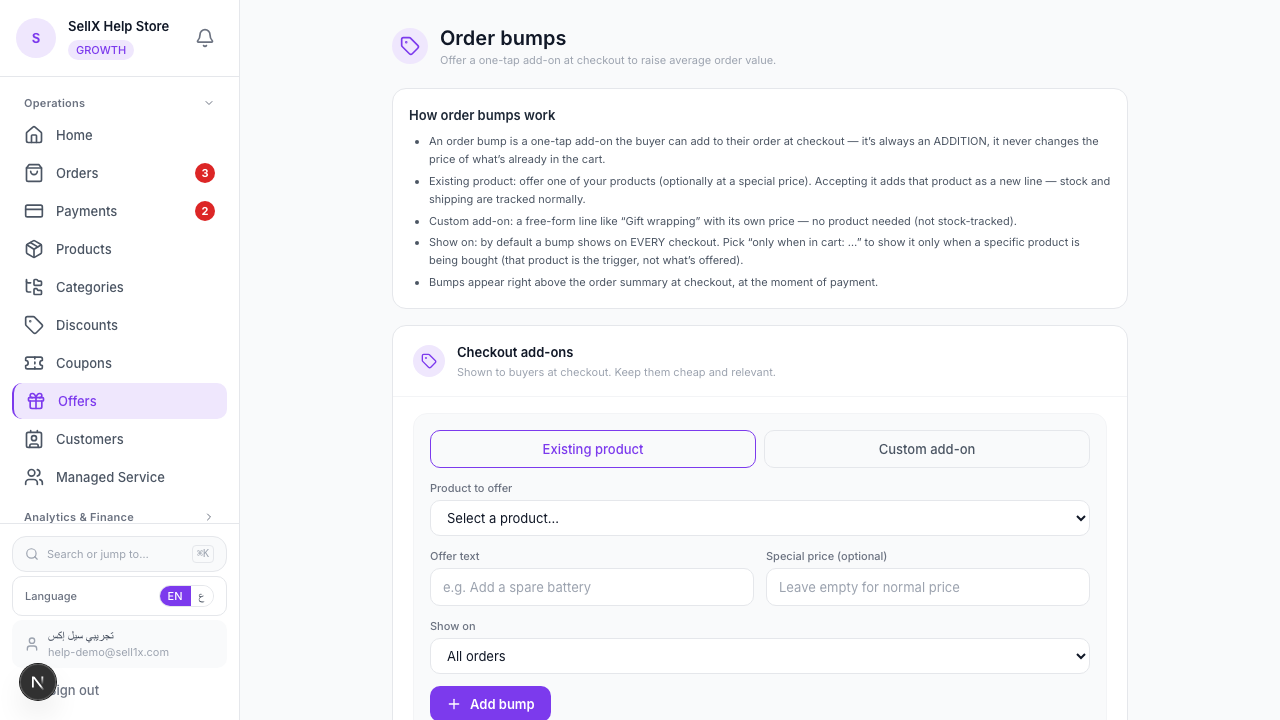
2. Choose the kind of bump
Pick Existing product or Custom add-on.
For an existing product: - Product to offer — choose the item - Offer text — the line the buyer reads, e.g. "Add a travel size" - Special price (optional) — leave empty to use the normal price
For a custom add-on: - Add-on name — e.g. "Gift wrapping" - Price (EGP) — what it costs
3. Decide where it shows
Under Show on, choose All orders, or Only when in cart: {a product} to target the bump to a specific item.
4. Add it
Click Add bump. Toggle it Active / Off any time, and reorder bumps by position.
What the Buyer Sees
Right above the order summary at checkout — the moment of payment — the buyer sees a tidy card with your offer and a single tap to accept. Accepting adds it to the order total. Declining changes nothing.
Bumps That Convert
1. The natural companion
Selling a phone? Bump the matching case. Selling shoes? Bump the cleaning kit. Relevance is everything.
2. The cheap impulse add
Keep it well under the main product's price. A 25–80 EGP add-on next to a 600 EGP order feels like nothing.
3. The margin booster
Gift wrapping, express handling, a small accessory — high-margin extras that cost you little but add to every order.
Tips
- One strong bump beats three weak ones. Don't clutter checkout. Lead with your best, most relevant offer.
- Use targeting. A bump tied to "only when X is in cart" feels personalised, not pushy.
- Keep the offer text short. The buyer is mid-checkout — one clear line wins.
- Pair with free shipping. A buyer reaching for your free-shipping threshold is primed to add the bump.
The Bottom Line
Order bumps catch the easiest extra sale you'll ever make — the one from a buyer who's already paying. Set one relevant add-on and watch your average order tick up on autopilot.
Start on sellX and add an order bump ←
Read next: Offer free shipping over X EGP to raise basket size